服务依赖
网盘下载
链接:https://pan.quark.cn/s/4fd44aad0df0
Git 客户端(非必须,建议下载,后续更新代码方便)
   # Mac OS
   brew install git

   # Ubuntu
   apt-get install git

   # Windows
   GitHub Desktop: https://desktop.github.com/

   # 其他优秀的 Git 客户端
   https://gitee.com/all-about-git
Anaconda or miniconda Python 环境管理器(非必须,可以用 UV 代替)
   https://www.anaconda.com/download/success

   https://docs.conda.io/en/latest/miniconda.html
uv 项目包管理工具,快速且好用
https://docs.astral.sh/uv/getting-started/installation/
   Windows :powershell -ExecutionPolicy ByPass -c "irm https://astral.sh/uv/install.ps1 | iex"
   Linux & Mac : curl -LsSf https://astral.sh/uv/install.sh | sh
MySQL、Redis 服务(非必须,用于存储历史行情数据)
Redis 可以不用安装
   # Mac OS
   brew install redis
   brew install mariadb

   # Ubuntu
   apt-get install redis-server
   apt-get install mariadb-server

   # Windows 自行百度搜索吧
   Redis 官网:https://redis.io/download
   Redis Windows:https://gitee.com/redis-windows/redis-windows
   MariaDB 官网:https://mariadb.org/download/
创建 MySQL 数据库,并创建项目使用的用户
  CREATE DATABASE chanlun_klines;
  CREATE USER 'chanlun'@'127.0.0.1' IDENTIFIED BY '123456';
  GRANT ALL ON chanlun_klines.* TO 'chanlun'@'127.0.0.1';
  flush privileges;
FutuOpenD 富途量化接口(非必须,如果使用富途的行情,则需要)
   介绍:https://openapi.futunn.com/futu-api-doc/intro/intro.html

   可视化客户端:https://openapi.futunn.com/futu-api-doc/quick/opend-base.html
飞书消息推送(非必须,用于接收程序发送的行情监控消息)
【监控与消息推送 - Chanlun-PRO】 【精准空降到 02:49】 https://www.bilibili.com/video/BV1ex4y1h7re/?share_source=copy_web&vd_source=297aeb105a193eb5dfe685fd5f4719a2&t=169
   ## 获取方式

   1. 打开飞书开放平台:https://open.feishu.cn/,并进行注册登录;

   2. 进入开发者后台:https://open.feishu.cn/app?lang=zh-CN,点击“创建企业自建应用”,输入自定义的名称和描述,选择自己喜欢的图标,进行“创建”;

   3. “添加应用能力”,选择“机器人”进行添加;

   4. “权限管理”, 搜索 “contact:user.employee_id” ,开通权限 “获取用户 userID”;

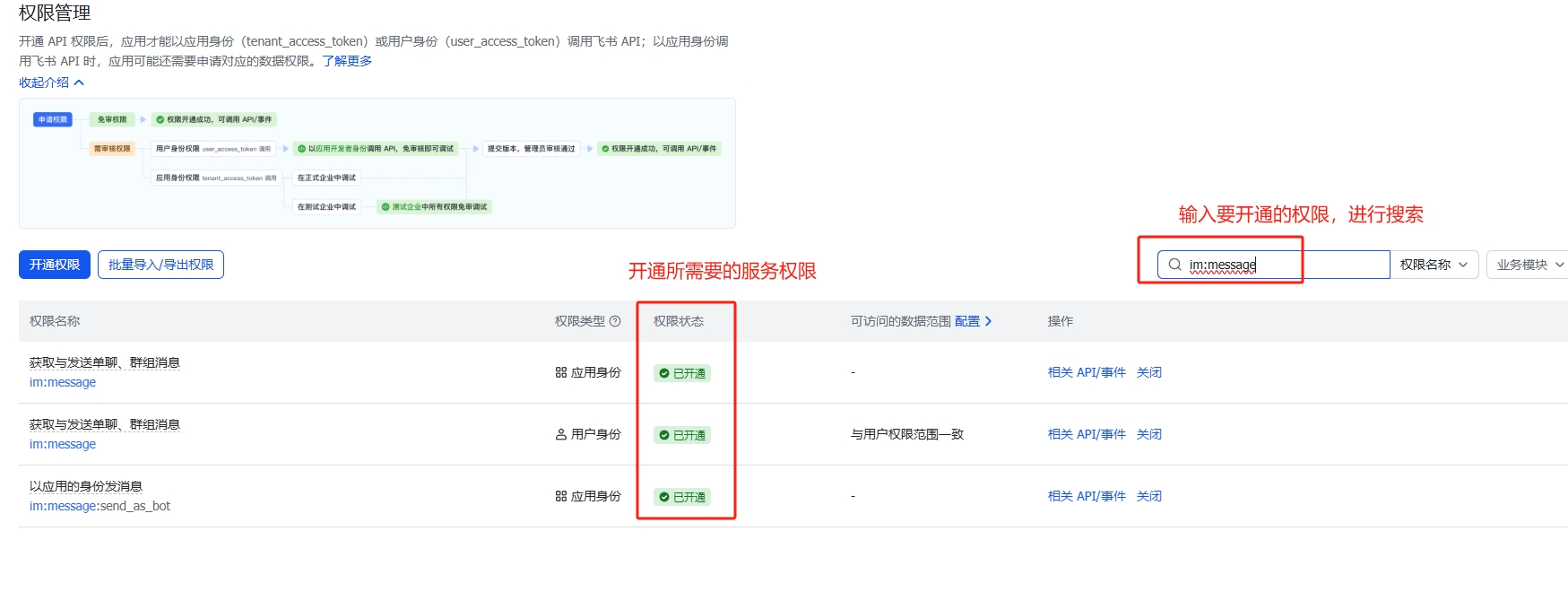
   5. 搜索 “im:message” ,开通权限 “获取与发送单聊、群组消息”;

   6. 版本管理与发布,选择“创建新版本”,输入版本号(例如:1.0.0),点击“发布”,“申请线上发布”;

   7. “凭证与基础信息” 页面,复制 App ID 与 App Secret 到对应的设置;

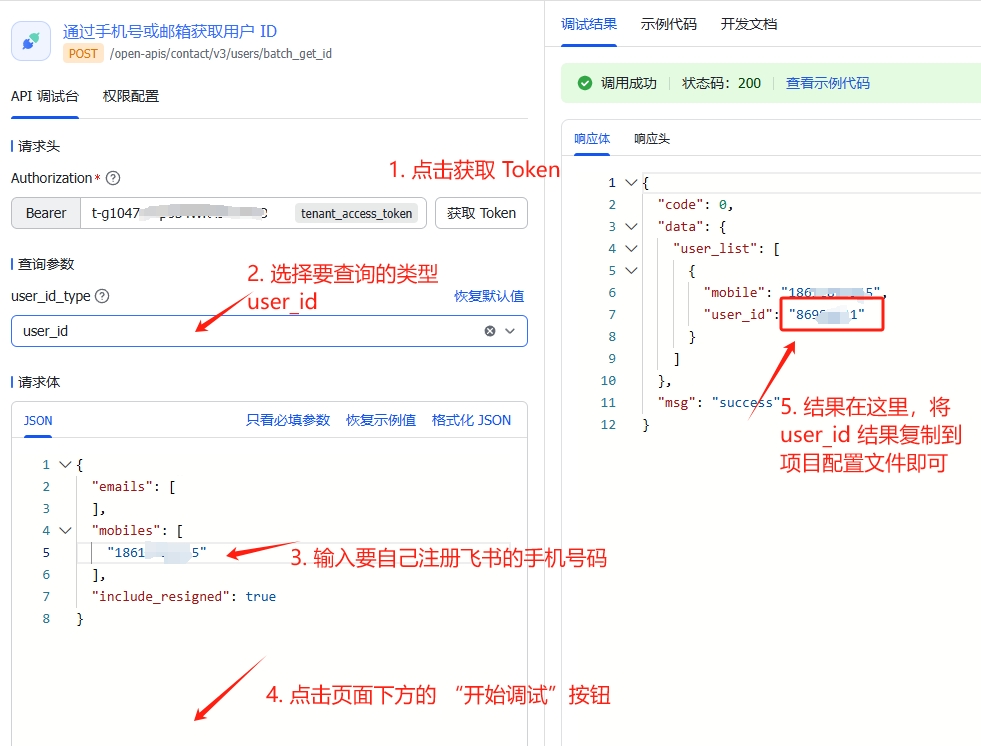
   8. 获取 UserID 字段方法,打开API调试台:https://open.feishu.cn/api-explorer/cli_a503a353effd100b?apiName=batch_get_id&from=op_doc_tab&project=contact&resource=user&version=v3

   9. 官方帮助文档:https://open.feishu.cn/document/faq/trouble-shooting/how-to-obtain-user-id

   10. 点击 API 调试台左侧「查看鉴权凭证」中 tenant_access_token 中的「点击获取」(如果之前已经获取过,则可以点击刷新按钮刷新鉴权凭证。

   11. 点击右侧参数列表,将查询参数 Tab 中的 user_id_type 参数设置为 user_id。

   12. 切换至请求体 Tab,将请求体中的 ID 删除,并修改 mobiles 参数,设为你自己的手机号。

   13. 点击右侧「开始调试」,调用接口。调用成功后,在下方响应体中即可拿到你自己的 User ID。

   14. 将 user_id 复制并填入配置文件中。
飞书权限批量导入
{
  "scopes": {
    "tenant": [
      "im:resource",
      "contact:user.employee_id:readonly",
      "contact:user.id:readonly",
      "im:message"
    ],
    "user": []
  }
}
飞书权限开通
飞书获取 user_id 方法
QMT 行情与交易(非必需)
   介绍:http://dict.thinktrader.net/nativeApi/start_now.html

   使用前提:下载 xtquant,解压后, 并放入 chanlun-pro/src 目录下,并打开 QMT交易端(极简模式)

   使用提示:第一次访问行情,系统会下载该标的的历史行情,第一次比较慢,尤其是低级别数据比较多,需要多等待,后续再次访问就快了。